Here are the steps to set up an old Netgear R6300 as access point (AP).
- Login to the Admin portal (192.168.1.1 or routerlogin.net)
- Click on the Advanced Tab
- Click on Advanced Setup
- Click on Wireless Settings
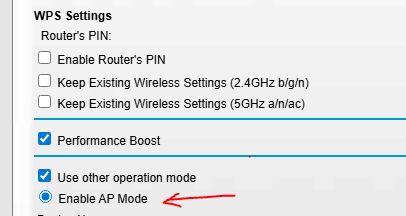
- Scroll down on the wireless setting page and click on “Use other operation mode”
NOTE: These instructions were tested on Firmware Version V1.0.2.80_1.0.59