
OVF (open virtualization format) –> is a collection of vm files (*.vmdks, *.ovf, *.mf, *.vhd). The OVF file itself is just an xml file that has information about the vmdks files in the directory. When I export my VM as an OVF, a directory is created that has an ovf file and vmdks … Take a look at my OVF directory below:
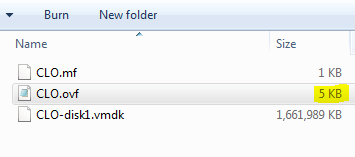
OVA (open virtualization Appliance) –> is just one single file (one single file), which could be considered as a zip of all the files that belong to the ovf directory. So if you want to share you VM on the internet you would create a single OVA file (just like a zip file). To consume the file, you have to convert it first to OVF ( just like you unzip a file before you use it).
References:
Distributed Management Task Force
http://www.dmtf.org/standards/ovf
OFV Format
http://www.ibm.com/developerworks/linux/library/l-open-virtualization-format-toolkit/
Open Virtualization Format Tool
http://communities.vmware.com/community/vmtn/vsphere/automationtools/ovf