
How much memory is Linux really using?

An htop on my system reveals this:

htop

memory_in_linux

So you would think that I am using about 4 gigs of Memory.

The “Mem” line is misleading so please do not use that. instead use the following command:

free -m

Pay attention to the -/+ buffers/cache line.

memory_in_linux2


Useful Websites

Linux ate my RAM
http://www.linuxatemyram.com/

Using top more efficiently
http://www.linuxforums.org/articles/using-top-more-efficiently_89.html

Experiments and fun with the Linux disk cache
http://www.linuxatemyram.com/play.html

Clear RAM Memory Cache buffer and Swap Space on Linux
http://www.tecmint.com/clear-ram-memory-cache-buffer-and-swap-space-on-linux/
Cannot extract temporary://update-cache, not a valid archive Drupal

If you are getting this error, chances are your PHP install is missing the zip extension.
A couple lines below the error message you should see the following sentence.

The following file extensions are supported: tar tgz gz bz2.

If the keyword “zip” is missing from that list then you are indeed missing this component.

Here are the steps to install it.

pecl install zip

Add this to your php.ini

extension=zip.so

Restart your webserver

Fix Drupal Content Images after moving your Drupal site

When you upload an image to the content of a Drupal 7 site. Drupal 7 adds the full path of the image to the actual content. If you are using Drupal 7 check the following table:
field_data_body
inspect the body_value column and you will notice that full relative path of the image within the body of the Drupal content.

That goes without saying that any images/assets added to the content will be broken, if you move your site from one directory to another or from a subdirectory to the root of the site.

Here is the mysql fix:
Run the following query to replace the path within the body_value column:

Example 1

Moving from subdirectory “/drupal7_test/” to “/”

update field_data_body set body_value=REPLACE(body_value, '/drupal7_test', '') where 1=1;

Example 2

Moving from subdirectory “/drupal7_test/” to “/drupal7_live/”

update field_data_body set body_value=REPLACE(body_value, '/drupal7_test', '/drupal7_live') where 1=1;

Double Sided Printing Long Edge vs Short Edge

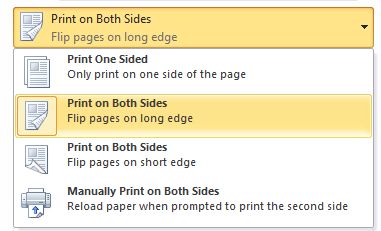
I wanted to print a document double sided and upon hitting the print button i saw the following options:
long edge vs shot edge double sided printing


If you pay attention to the Icons, you will understand the meaning of Long Edge and Short Edge.

Succinctly:

Long Edge: Book Like

Short Edge: Notepad like