
Enable Standard User to Run a Program as an Administrator

First

Create a Batch File “C:\myprogram.bat” with the following line in it (make sure you replace notepad with your own program):

runas /user:COMPUTERNAME\Administrator /savecred "C:\Program Files (x86)\Notepad++\notepad++.exe" 

Second

The first time you run the batch file above you will get prompted for your administrator password.

Run the Batch File first, so you can register your password.

Third

Disable the annoying DOS Prompt. Create another batch file and put the following lines in it:

Set WshShell = CreateObject("WScript.Shell" ) 
WshShell.Run chr(34) & "C:\myprogram.bat" & Chr(34), 0 
Set WshShell = Nothing 

Voila. You are good to go.
MD5 Quick Facts

Number of possible an md5 string:

16 possibilities for each digit (0-9 (10 possibilities) and A-F (6 possibilities)), there are a total of 32 digits
so the number of possible combinations is :
16 ^ 32 : 3.4028237 * 10^38

Another way you could calculate it is:

Each Digit of an MD5 represent 4 bits (Hexadecimal). So for 32 digits we have a total of
32 * 4 = 128 bits
so 
2^128 = 3.4028237 * 10^38

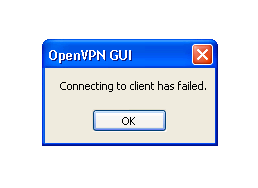
OpenVPN GUI:Connection to client has failed on Windows

OpenVPN Connection to client has failed

Connection to Client has failed

There is something blocking the connection to the OpenVPN server. Here are the steps to solve this isssue.

First

Check the log files

Second

Check your Firewall

Third

Open your client.conf file and make sure that the paths to your certificates are absolute path
replace for example:
key client.key with
key "c:\\Program Files\\OpenVPN\\config\\client.key"