
Update Centos 5.7 to 6.2

How to Update my Centos 5.7 server  to  the new 6.2 version?

Upgrading from 5.7 to 6.2 is a major upgrade, contrary to upgrading your system from 5.6 to 5.7, which is a minor upgrade.

yum can handle the minor upgrades.
Major upgrades apparently are not supported.
http://centos.org/modules/newbb/viewtopic.php?topic_id=36050&forum=55

So if you want to upgrade your server from 5.7 to 6.2 , you are on your own.
The best way is too implement a new centos 6.2 server and transfer your files.

Centos 5 Base Repos

If you change your Centos Repo and you want to restore the original repos, here are the ones that Centos comes with out of the box:

[base]
name=CentOS-$releasever - Base
mirrorlist=http://mirrorlist.centos.org/?release=$releasever&arch=$basearch&repo=os
#baseurl=http://mirror.centos.org/centos/$releasever/os/$basearch/
gpgcheck=1
gpgkey=file:///etc/pki/rpm-gpg/RPM-GPG-KEY-CentOS-5

#released updates
[updates]
name=CentOS-$releasever - Updates
mirrorlist=http://mirrorlist.centos.org/?release=$releasever&arch=$basearch&repo=updates
#baseurl=http://mirror.centos.org/centos/$releasever/updates/$basearch/
gpgcheck=1
gpgkey=file:///etc/pki/rpm-gpg/RPM-GPG-KEY-CentOS-5

#additional packages that may be useful
[extras]
name=CentOS-$releasever - Extras
mirrorlist=http://mirrorlist.centos.org/?release=$releasever&arch=$basearch&repo=extras
#baseurl=http://mirror.centos.org/centos/$releasever/extras/$basearch/
gpgcheck=1
gpgkey=file:///etc/pki/rpm-gpg/RPM-GPG-KEY-CentOS-5

#additional packages that extend functionality of existing packages
[centosplus]
name=CentOS-$releasever - Plus
mirrorlist=http://mirrorlist.centos.org/?release=$releasever&arch=$basearch&repo=centosplus
#baseurl=http://mirror.centos.org/centos/$releasever/centosplus/$basearch/
gpgcheck=1
enabled=0
gpgkey=file:///etc/pki/rpm-gpg/RPM-GPG-KEY-CentOS-5

#contrib - packages by Centos Users
[contrib]
name=CentOS-$releasever - Contrib
mirrorlist=http://mirrorlist.centos.org/?release=$releasever&arch=$basearch&repo=contrib
#baseurl=http://mirror.centos.org/centos/$releasever/contrib/$basearch/
gpgcheck=1
enabled=0
gpgkey=file:///etc/pki/rpm-gpg/RPM-GPG-KEY-CentOS-5

Why is everybody keep using Mon, 26 Jul 1997 as a date in the past (PHP Headers)?

In order to disable browser cache on dynamically generated pages, PHP uses the header method below:

header("Expires:  Date_in _the_past");

Over the years most people have been using the following:

header('Expires: Mon, 26 Jul 1997 05:00:00 GMT');

If you don’t believe just do this Google Search.

There are only a couple of problems however:

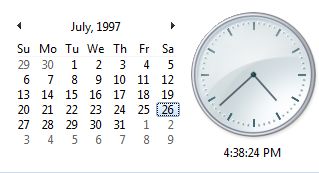
FIRST PROBLEM : Jul 26 1997 fell on a Saturday not on a Monday.

SECOND PROBLEM : Why does it have to be that date?

There are plenty more dates to choose from anyway, so why is that one (Mon, 26 Jul 1997 ) or should we say (Sat, 26 Jul 1997) so special?

If you have any ideas, please drop me a comment.


Related Sites:

http://www.ietf.org/rfc/rfc2616.txt 
http://www.w3schools.com/php/func_http_header.asp