
Enable auto-reconnect VLC Streaming

“NOT INTUITIVE” that all I can say about some of the configuration options in VLC. You are really finding out that something is not intuitive when you have the directions and still not able to find the options.  Most open source software suffers from one thing: shaky UI design and from what i can see this software is no different.

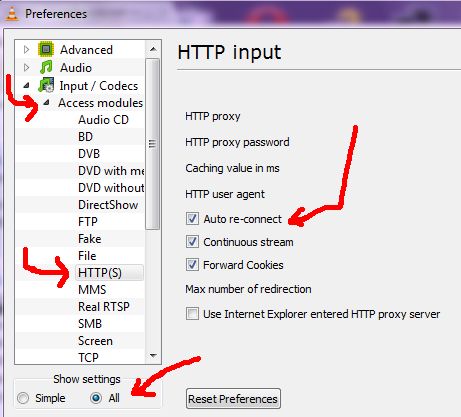
If your stream stops after each song, you might not have auto-reconnect enabled on the client side.

Here is how to  enable auto-reconnect:

Let’s see how to enable auto-reconnect in VLC

1. Click on Tools then Preferences.

2.  Click on “ALL” (show settings-> bottom left corner) see image below

3. The click on “input/codecs” -> Access modules

4. And click on HTTP(s)
Cannot find either column “dbo”…or the name is ambiguous

"Cannot find either column "dbo" or the user-defined function or aggregate "dbo.fnycsoftware", or the name is ambiguous."

If you are absolutely sure that you do not have have another function with that name and the function is working fine, you might be getting this error because of a caching  issue with microsoft sql managemet studio.

FIX: Close Microsoft Management Studio and reopen the function.

Minutes Difference Same Day (T-SQL)

// Get a time in the format : 8:00 AM
// Returns the minute difference in integer using the current time
// (only works for the same day but you can modify to work for any date).

ALTER FUNCTION [dbo].[GetMinutesDifference](@JustTime varchar(50))
RETURNS int
AS
BEGIN
    DECLARE @MinuteDifference int
	Set     @MinuteDifference = (SELECT DATEDIFF(minute, CONVERT(SMALLDATETIME, CONVERT(VARCHAR(8), GETDATE(), 112) + ' ' + @JustTime) , GETDATE()))
	Return  @MinuteDifference
END

OPENVPN Useful Sites

OPENVPN can be very tricky to set up  but with the right resources the setup is not quite as bad.  I tried to follow the OPENVPN manual (http://openvpn.net/index.php/open-source/documentation/howto.html)  but before I know it I was completely lost.  The subject got real complicated real fast; so naturally I turned to my dear friend GOOGLE and i was not disappointed.

These websites below made the process very easy for me  so hopefully they will do the same for you.

OpenVPN Windows HowTo  (A little old but very useful)
http://www.runpcrun.com/howtoopenvpn

How to configure OpenVPN (A little old but very useful)
http://www.itsatechworld.com/2006/01/29/how-to-configure-openvpn

Also did you know that Microsoft Windows comes with VPN out of the BOX?
Check these two videos out