
FUSION WOL
http://download.cnet.com/Wake-On-LAN/3000-2085_4-10486163.html?part=undefined&subj=dl&tag=button

SolarWinds WOL
http://www.solarwinds.com/register/MoreSoftware.aspx?External=false&Program=214&c=70150000000CcH1

Magic Packet
http://magicpacket.free.fr/
Windows XP Client RDP Multiple Monitors Vmware Windows 7 Guest
In order to use dual monitors RDP for a Windows 7 vm guest:
1. You will need to first download RDP Version 7 (if you are not running version 7)
2. Your VM guest must be running Windows Server 2008 or Windows 7 Ultimate or Windows 7 Enterprise.
NOTE THAT MULTI-MONITORS RDP DOES NOT WORK ON WINDOWS 7 PROFESSIONAL.
Before RDP version 7
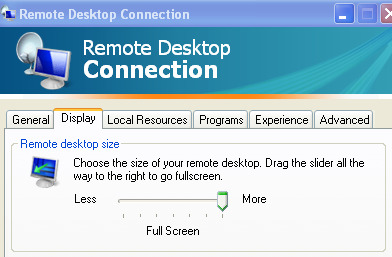
After Installing RDP version 7
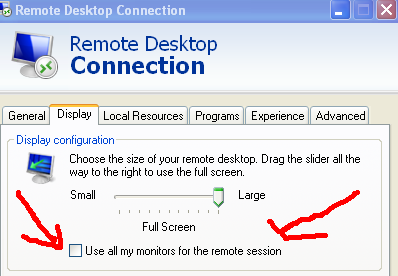
The Remote Desktop Client Version 7 can be download here:
http://support.microsoft.com/kb/969084
http://www.microsoft.com/download/en/details.aspx?displaylang=en&id=20609
Related Links
http://serverfault.com/questions/284667/two-monitor-in-one-vm
http://blogs.msdn.com/b/rds/archive/2009/07/01/using-multiple-monitors-in-remote-desktop-session.aspx
Social Bookmark and Sharing Tools
Sharethis
http://sharethis.com/publishers/get-sharing-button
Addthis
http://sharethis.com/publishers/get-sharing-button
Add toAny
http://share.lockerz.com/buttons/
ShareIcon
http://shareicons.com/
Shareaholic
http://www.shareaholic.com/
Using Putty without a Password
First
Download Putty and Puttygen.exe : http://www.chiark.greenend.org.uk/~sgtatham/putty/
Second
Follow the directions that are on the following website http://www.codelathe.com/blog/index.php/2009/02/20/ssh-without-password-using-putty/
or
http://www.howtoforge.com/how-to-configure-ssh-keys-authentication-with-putty-and-linux-server-in-5-quick-steps
Note:
1. The authorized_keys file content should start with the "ssh_rsa" keyword followed by a space.
2. The mumble-jumble characters of the public key should be on one line (right after the space).
3. Sometimes the default home directory of a user is changed to a different path make sure that you add the .ssh and authorized_keys to the new path.
PCI serial port Dell Optiplex 755 Windows 7
Error

1. First
Run windows Updates
2. Second
Install the followings:
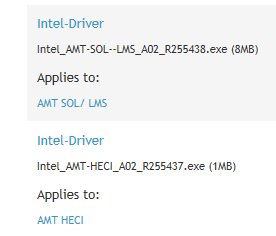
Download the followings:
http://www.dell.com/support/drivers/us/en/04/DriverDetails/DriverFileFormats?DriverId=R255437&FileId=2731111318