To change the space between the radio buttons in your form just add this to css:
input [type="radio"] {
  margin-right:20px;
}
Replace “20” with the number of pixel that you want.
To change the space between the radio buttons in your form just add this to css:
input [type="radio"] {
margin-right:20px;
}
Replace “20” with the number of pixel that you want.
Ever wanted to know the equivalent of the linux uptime command in Microsoft Windows Servers, if so just download this utility from Microsoft:
http://support.microsoft.com/kb/232243
I always thought that the following command “mv * ..” would move everything from the subdirectory to the parent directory. Apparently, it does not move hidden files (files that start with the period) such as .htaccess. I could almost swear that it did.
Goal: I want to move all files and subdirectories from te /home/ycsoftware/test to /home/ycsoftware.
while inside the /home/ycsoftware/test I ran this command:
mv * ..
This command above does not move the hidden folders, but it move everything else.
Then I tried
mv * .* ..
This one works as intended
or
mv * .* /home/ycsoftware
(move everything from the current directory to another directory
This will move everything even the files that start with a period such as .htaccess , .profile and so on.
Also if you use the full path, everything works as it is supposed to:
mv /home/ycsoftware/test home/ycsoftware
Make sure that you remove "height=XXX px" on the parent container.
There should not be a height in the parent div container.
Verify that the .htaccess is present in your root folder (the folder that contains the index.php of your website).
For drupal the first few lines of the .htaccess file look like the following (don’t tell me that it is empty – it should not be empty):
# Apache/PHP/Drupal settings:
#
# Protect files and directories from prying eyes.

  Order allow,deny

# Don't show directory listings for URLs which map to a directory.
Options -Indexes
if you do not see these lines then something is wrong. Unzip the drupal 7 again and locate the .htaccess and copy it to your root (the location of your index file). Again, Drupal does come with a .htaccess file, there is no reason to copy and paste stuffs that you find online, unless you know what you are doing.
Make sure that your server is reading the .htaccess file.
Open the .htaccess file type some random characters in it and save the file. Try to navigate to your website. You should get an internal server error:
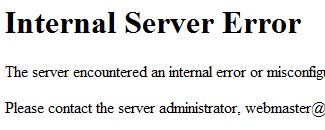
If can see your site without a problem then your server is NOT reading the file.
Open you apache2.conf or http.conf and change the AllowOverride directive:
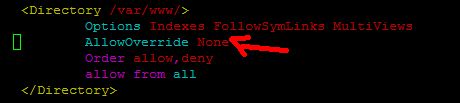
to
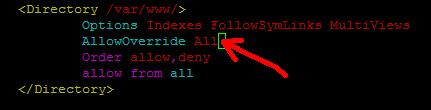
THEN RESTART THE APACHE SERVICE (IMPORTANT).
Fourthly, Now go and navigate to your website.
If you do get the internal server error that means that the server is now reading your .htaccess file. Go back to your .htaccess file and remove the random characters and save.
Enable the "Clean URL" Feature
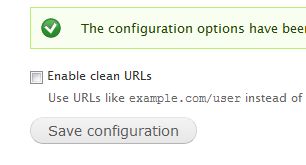
Now go back to your drupal admin and enable “CLEAN URL”