
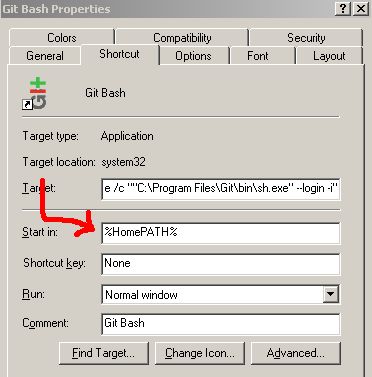
Right click on the Gitbash icon and click on Properties then change the Start in to your custom directory.
Useful Sites
http://markashleybell.com/articles/portable-git-windows-setting-home-environment-variable
Right click on the Gitbash icon and click on Properties then change the Start in to your custom directory.
Useful Sites
http://markashleybell.com/articles/portable-git-windows-setting-home-environment-variable
How do you wake up your PC , if it is sleeping or if it is in hibernate state.
1. BIOS
Enable WOL on your BIOS first there should be an option in your BIOS for that. Most likely you will find that option under power or network.
2. Network Card
Enable WOL (in your network cards)
3. Software Utility
Windows Users
http://www.matcode.com/wol.htm or
Mac Users
http://www.apple.com/downloads/macosx/networking_security/wakeonlan.html
With this Ribbon thing it is becoming harder and harder to support people over the phone, because simply you do not know where everything is anymore. Where the heck do i find email signature in Microsoft Office 2010? Sometimes change is good, but why would Microsoft create this ribbon thing and not giving us an option to switch it to a legacy menu? Why would they change a system that is second nature to people?
Here is how to change the email signature in office 2010
Click on File -> Option -> Mail
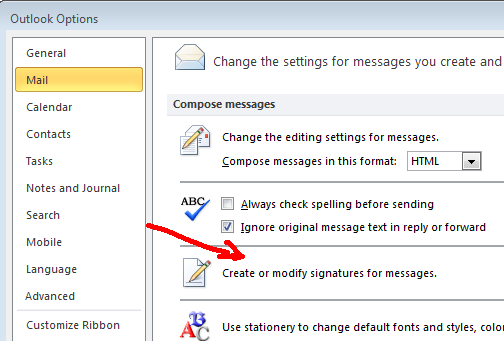
Then you go from there.
Here is a a video that Microsoft provided
http://office.microsoft.com/en-us/outlook-help/create-e-mail-signatures-RZ102000409.aspx?section=2
UNIX/LINUX
echo $PATH
WINDOWS
echo %PATH%
List all Environment variables
UNIX/LINUX
printenv
Reference
Windows Environment Variables
http://www.microsoft.com/resources/documentation/windows/xp/all/proddocs/en-us/ntcmds_shelloverview.mspx?mfr=true
Linux Environment Variables
http://compdocs.blogspot.com/2007/09/show-environment-variables-linux.html
Comparison vs DOS and Linux Shell Command Line
http://www.yolinux.com/TUTORIALS/unix_for_dos_users.htm
Other Useful Links
http://vlaurie.com/computers2/Articles/environment.htm
Difference Between su and su – (su minus sign)
When you use “su” with the minus sign, the “login profile” of the user that you are trying to login as is executed. Meaning that it is like you were login exactly as that user.
If you do not use it (the minus sign), you do not inherit the login profile of that user. So you may have to use the full path of most programs in order to access them. Instead of “$ iptables status” you will need to use the full path to that command : “$ /etc/init.d/iptables status” if you do not use the minus sign
So if you plan on using su, it might be a good thing to always use the minus sign.
Reference
Use “su” with the minus sign
http://www.wellho.net/mouth/2203_Always-use-su-with-minus-And-where-do-programs-come-from-.html