
Serial Port Programming

A friend of mine from the electrical engineering department at my old university approached me once and wanted to get some ideas about an engineering project for his senior design class. He wanted to link several electronic devices together via the serial port and also communicate with with them via the internet.

I  realized then how little that I knew about  serial port programming and I wanted to change that quickly.  While working on this project, I came across a few documents that were very useful and here they are:

Serial Programming HOWTO
http://tldp.org/HOWTO/Serial-Programming-HOWTO/intro.html

Serial Programming Guide for Posix Operating Systems
http://www.easysw.com/~mike/serial/serial.html

Serial Port Programming Linux and Windows (PDF)
http://gatech.cueyoueye.com/PopShot/res/documents/Serial_Win_02_1_.pdf

System.IO
http://msdn.microsoft.com/en-us/library/gg145019.aspx

Any Serial Ports
http://www.anyserialport.com/
Center DIVs

To center a DIV container use the following:

padding-left:auto; 
padding-right:auto

or

margin:auto;

in your css file
Make sure you also set the width of your “DIV” tag

Access Windows Shares on a Mac

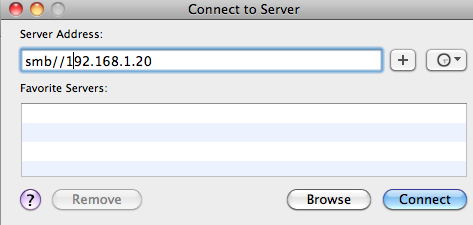
To Access a Windows Share Drive on a Mac just open Finder

On the menu bar you will find “GO” click on it and then click on “Connect to Server” you should see something like :

if the network drive requires authentication, when prompted go ahead and enter your credentials otherwise you are good to go.

Reference
if you want a detail tutorial check the following site
http://lifehacker.com/#!247148/how-to-mount-a-windows-shared-folder-on-your-mac

Send emails to Phones (Text Messages)

Many may not have realized it but you can actually send email to a phone number as text messages.

For example if you want to send a text message to an ATT friend with phone number (561) 123 4567 and text services. You can send them emails as text messages using the following email address:

5611234567@txt.att.net

For a list of email gateways for all cellphone providers check the following wiki article:

list of SMS gateways
http://en.wikipedia.org/wiki/List_of_SMS_gateways

Cron Useful Documentation

Cron is not too hard to use but if you stay away from it for a while or if  you jump from one Linux flavor to another (not mentioning UNIX and Mac), there is a big change that you are going to run into issues that you cannot really explain. This post highlights the most common
scenarios that you are likely to run into.

Default location of Cron Files
/var/spool/cron/crontabs
use the "> /dev/null 2>&1" (do not use the double quotes) to redirect error messages to void. Use it to disable email on error.
/3 ****  php -f ycsoftware.php (repeat every three minutes)
* */6 *** php -f ycsoftware.php (repeat every 6 Hours)
(the forward slash in a cron job does not work in all Linux flavors)
if your cron job is not working chances are that you do not have permission to run the cron job. Check and make sure that you are not denied access by locating the con.deny on your system. Also if you are not listed on cron.deny make sure that you are added to cron.allow file if that file is not empty.
Make sure that collect the result in a log file for debugging purposes for example
3 ****  php -f ycsoftware.php > /home/ycsoftware/mycrons/ycsoftware.log 2>&1
All asterisk in a cron job :
* * * * *   php -f ycsoftware.php
means every minute of everyday of every week of every month.
for more info just check the manual
man crontab
or man cron

Quick Reference
http://en.wikipedia.org/wiki/Cron

Others
http://adminschoice.com/crontab-quick-reference