VirtualBox High CPU Problem (Illustration)

With the release of Oracle VirtualBox version 4.0.4 , I was crossing my finger hoping that this issue was resolved, but apparently it is the same deal.

Problem:  VirtualBox CPU usage goes crazy even though the guest is idle. The only way i can get it to calm down is to create a dummy guest machine and run it simultaneously with the main VM.

Here is a video that illustrates my point:
http://www.youtube.com/watch?v=Jon1o_m9HQ8&feature=player_embedded

HERE ARE MY SPECS

Hopefully this video above will give everybody a clear idea of the issue.

Related Links:
http://www.virtualbox.org/ticket/1884

Switch VirtualBox Storage Controller From IDE to SATA

To increase VirtualBox’s performance it is necessary to start by changing any storage that are still using the IDE controller to SATA controller. There are  many tutorials out there but this one is the easiest.

Here are the steps:

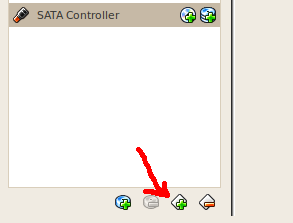
  1. First add a new SATA controller (Under Storage)
  2. Then Start the VM
  3. The next step is to install the “Intel(R) Matrix Storage Manager
    http://downloadcenter.intel.com/SearchResult.aspx?lang=eng&ProductFamily=Chipsets&ProductLine=Chipset+Software&ProductProduct=Intel%C2%AE+Rapid+Storage+Technology+(Intel%C2%AE+RST)

  4. Shutdown the VM
  5. Go back to the “Storage” area and right on existing IDE storage and click on Remove and then go to the SATA area and add the storage there,
  6. Restart the VM

Two Way Sync Sharepoint Lists to Microsoft Excel 2007, 2010

1.  Solution # 1
Microsoft claims that they have a solution, but their given solution has never worked for us:
http://msdn.microsoft.com/en-us/library/bb462636(v=office.11).aspx
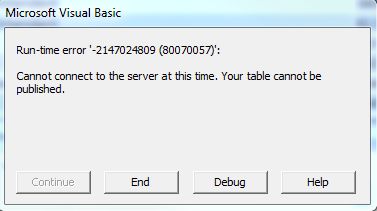
Every time that we try it we keep getting this stupid error message:

A little more research gives us this so-called workaround :
http://support.microsoft.com/kb/838703/en-us
If can figure it out, please make sure you add a comment to this post.

OR

2.  Solution# 2
You can download this software:
http://www.softfluent.com/xlsync_freeversion.htm

Need to be at least a power user to un this tool
Must use Internet Explorer
Must run IE as an Administrator (if you are not an administrator)

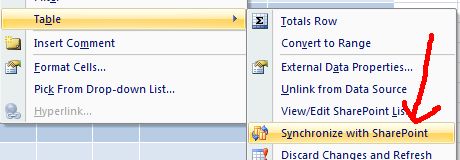
Then you can do things like that:

Reference
http://office.microsoft.com/en-us/sharepoint-foundation-help/synchronize-a-sharepoint-list-with-a-spreadsheet-program-HA101854204.aspx
http://www.shahine.com/omar/Excel2007CannotTwoWaySyncToSharepoint.aspx
Good luck!