
- Adding Header and Footer to a Report
- Working with “lists” in reporting services
- Adding Images
- Microsoft Report Viewer Redistributable 2008
- Reporting Viewer Samples
- Features of Reporting Service
- http://www.microsoft.com/sqlserver/2008/en/us/
- Reporting Services
- Ten Common SQL Server Reporting Services Challenges and Solutions
http://www.simple-talk.com/sql/reporting-services/ten-common-sql-server-reporting-services-challenges-and-solutions/
- Number of records per page
http://social.msdn.microsoft.com/forums/en-us/sqlreportingservices/thread/5F7B11E7-6522-4CC9-8C17-3CEC42E97A08
- Reporting Services Forums
http://social.technet.microsoft.com/Forums/en/sqlreportingservices/threads
Useful Network Scripts Websites
Installing Microsoft Dynamic GP
Installing most software on Microsoft platforms are usually straightforward but as soon as you start delving into active directory, enterprise software, .net framework versions not coping with one another the conception is drastically changed.
I have tried to install GP on a windows server 2003 and all of a sudden i get this:
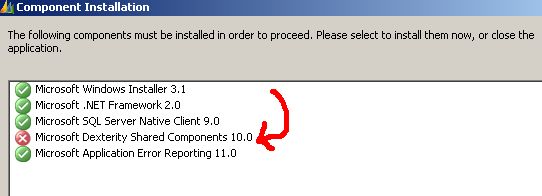
First of all that does not tell me anything. When i looked into the event viewer i get the following message
"Product: Dexterity Shared Components — .NET Framework 2.0 is not installed. The installation cannot continue."
Ok why do i get a green check mark on Microsoft.net 2.0?That is stupid!
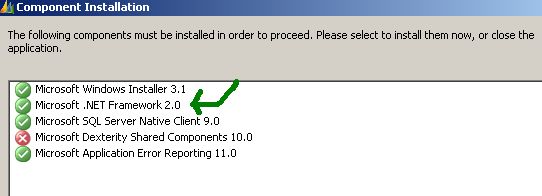
Now I am like "ok" let me download .net 2.0 .Apparently, i cannot install .net 2.0 because .net 2.0 sp1 is already installed. Now For God's Sake why don't they make just one framework and keep on updating it.
I did use the .net cleanup tool to remove .net 2.0 and restarted the install.
The install tool care of the .net 2.0 installation and Voila
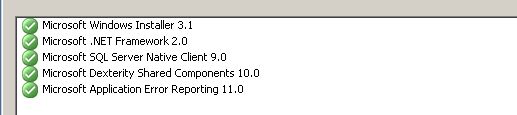
For more details on this issue please visit this blog
Microsoft Software Installation Checklist
- Make sure that all the .net Framework are installed. (From my experience even if you installed the latest framework, their software complains for an old one down the road).
- Make sure you have the .net cleanup Tool (Download one Here)
- You could benefit from having the installer cleanup tool installed
- Here is a tool that will tell you what .net framework you have installed you have installed on your system.
Download All .net Frameworks
Download all .net (dotnet) frameworks
To download the .NET Framework 1.0, visit the following Microsoft Web site: http://www.microsoft.com/downloads/details.aspx?FamilyID=d7158dee-a83f-4e21-b05a-009d06457787&DisplayLang=en
To download the .NET Framework 1.0 Service Pack 3, visit the following Microsoft Web site: http://www.microsoft.com/downloads/details.aspx?familyid=6978D761-4A92-4106-A9BC-83E78D4ABC5B&displaylang=en n)
To download the .NET Framework 1.1, visit the following Microsoft Web site: http://www.microsoft.com/downloads/details.aspx?familyid=262D25E3-F589-4842-8157-034D1E7CF3A3&displaylang=en
To download the .NET Framework 1.1 Service Pack 1, visit the following Microsoft Web site: http://www.microsoft.com/downloads/details.aspx?familyid=A8F5654F-088E-40B2-BBDB-A83353618B38&displaylang=en
To download the .NET Framework 2.0, visit the following Microsoft Web site: http://www.microsoft.com/downloads/details.aspx?FamilyID=0856eacb-4362-4b0d-8edd-aab15c5e04f5&DisplayLang=en
To download the .NET Framework 2.0 Service Pack 1, visit the following Microsoft Web site: http://www.microsoft.com/downloads/details.aspx?familyid=79BC3B77-E02C-4AD3-AACF-A7633F706BA5&displaylang=en
To download the .NET Framework 3.0, visit the following Microsoft Web site: http://www.microsoft.com/downloads/details.aspx?familyid=10CC340B-F857-4A14-83F5-25634C3BF043&displaylang=en
To download the .NET Framework 3.0 Service Pack 1, visit the following Microsoft Web site: http://www.microsoft.com/downloads/details.aspx?familyid=EC2CA85D-B255-4425-9E65-1E88A0BDB72A&displaylang=en
To download the .NET Framework 3.5, visit the following Microsoft Web site: http://www.microsoft.com/downloads/details.aspx?familyid=333325FD-AE52-4E35-B531-508D977D32A6&displaylang=en
To download the .NET Framework 3.5 Service Pack 1 Full package, visit the following Microsoft Web site: http://www.microsoft.com/download/en/details.aspx?id=25150
To download the .NET Framework 4.0, visit the following Microsoft Web site: http://www.microsoft.com/download/en/details.aspx?id=17851
Related Links
http://support.microsoft.com/kb/923100
http://ycsoftware.net/net-cleanup-and-download-pages/